Showing posts with label Adobe Photoshop. Show all posts

IAI Ghost UAV | A Photoshop creation

For a change, I would like to write about completely Photoshop work with zero use of camera / photography. If you are good at Photoshop, you can create anything where camera has no access to take a shot or you may create from your imagination.

IAI Ghost UAV
IAI Ghost UAV

Do you know IAI Ghost? It is an UAV (Unmanned Ariel Vehicle) that uses for reconnaissance. It was developed by IAI (Israel Aircraft Industries). It has similar appearance of Chinook helicopter. But Ghost is mini with 4 kg weight and 1.45 meter (4.7 feet) length. It can fly up to 4 km during 30 minutes flight time with the maximum speed of 64.8 km/h (40 mph).

I have used Path to create body frame and some gadgets. Also, I used Shape tool for creating some objects. Blur filter effect was supportive to make rotors’ spinning effect. Layer style was helpful for making color effect over the body. It took nearly 30-45 minutes to complete the tasks. Have a try!

Photographing Butterfly

Butterfly and beauty are always good combination. Colorful butterflies get attention from kids to adults. When it comes to photographing butterfly, you should to have some basic setups. First, you should have camera with zoom lens or macro lens. Zoom lens is ideal to capture butterflies that always keep distance from people. Macro lens is ideal for close shots of butterflies that could stay closer to people. Secondly, you should have patience. Some butterflies flies faster, some flies like zigzag and some never stay calmly.
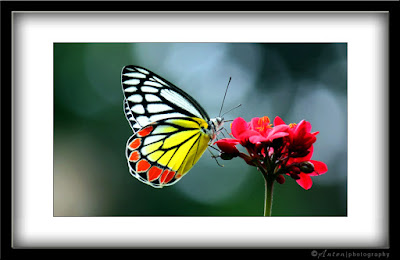
Common Jezebel (Delias eucharis)

In this picture, you can see Common Jezebel (Delias eucharis) which is medium size and bit faster. But when it sits on flower, you could have nice view and significant amount of time. Also, the Common Jezebel is one of the beautiful butterflies. It has scarlet like reddish, yellow, white and black borders. The color combination and patterns especially spearhead and heart shape on edge give additional elegancy.

Due to 250 mm focal length, it gives nice blur background and slightly bokeh. The bunch of reddish small flowers adds more beauty to scenery. In addition, I have made a thick frame. A nice frame could give additional beauty to the image. However, it is not good idea to create frame all your photographs. You may try with a few pictures. The frame is created through Adobe Photoshop. Shutter speed was 1/250 for reducing blur due to wing movement. If aperture size was f/11 or more high number, it could create more sharpness on the objects – butterfly and flower.

Camera settings:
  • Aperture size: f/5.6
  • Shutter Speed: 1/250 sec.
  • ISO: 200
  • Focal length: 250mm

Main four colors in this image

ff4210 f8ff1f ff0f3a 174221

Selective Color

Selective Color effect has nothing in photography as it comes under digital editing. Mostly it is done though Adobe Photoshop. Actually, it is not photography, and it does not deal with camera. But selective color is welcome my many user. If you are a traditional or orthodox photography lover, I am sure you will reject the idea. A user who is good at Photoshop or any other software can perform wonderful results.

I do enjoy the idea. I feel that it give much focus to the subject. It is like highlighting by a highlighter pen when you read a book or note.

Red rose
Selective Color | Red Rose

The image has three main color such as red, green and white. My main idea is to focus the red rose. I do not want to highlight white background or green leaves. Therefore, I made those unwanted area by black and white / mono color. I wanted highlight the red rose only. Also, note that those leafs are not fully focused.

Boulevard

Boulevard is definitely a heart touching scenery. It is good to walk in greenery road while enjoy the nature. Psychologically it gives benef...